
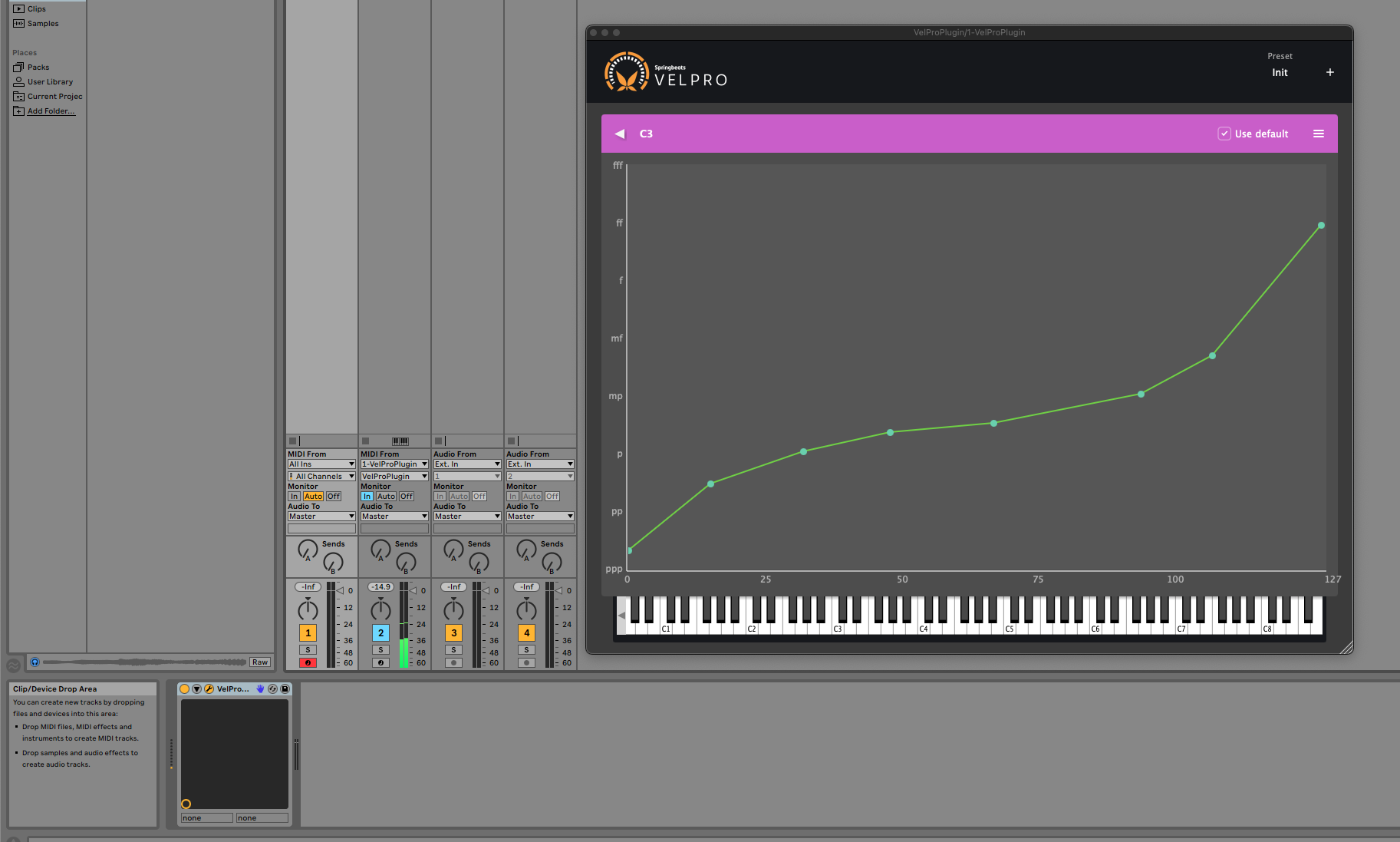

Velpro, the MIDI velocity curve tool for producers and keyboard players, is now available as a VST3 plugin alongside its standalone version. Adjust velocity curves per track, save them with your project, and never leave your DAW. Here’s why I changed my mind, and what it means for your workflow.
It has been said that a wise man changes his mind sometimes, but a fool never does. It has also been said that the customer is always right. Both of these things are only partially true, of course, in the way that most things people say with absolute certainty tend to be. But when both of them start pointing in the same direction at once, even the most stubborn of developers has to sit up and take notice.
Three years ago, I wrote a whole article explaining why Velpro was a standalone application and not a VST plugin. It was well-reasoned. It was logical. It made excellent points, if I do say so myself. And it ended with the words “if there is enough demand, I’ll work on it!” (the kind of sentence a person writes when they are quietly confident that nobody will actually call their bluff).
You called my bluff.
Why Velpro was a standalone velocity curve tool
My original argument boiled down to two things.
First, universality. A standalone app sits between your MIDI controller and everything else. It doesn’t care whether you’re running Ableton, Logic, FL Studio, or some obscure tracker you found on a Finnish BBS in 2003. It just works. Everywhere. All the time. No need to load a plugin into every project and pray it behaves.
Second, compatibility. VST2 didn’t properly support MIDI-only plugins. The plugin format landscape was a patchwork of competing standards, each with its own quirks. And testing a plugin across every DAW on the market, as a solo developer, is the kind of endeavour that makes you question your life choices somewhere around the fourteenth crash report from a host you’ve never heard of.
Both of these points were correct. I stand by them today. The standalone version of Velpro is still, for many use cases, the most sensible way to handle velocity curves.
And yet.
How VST3 changed everything for MIDI velocity plugins
The world, as it has a habit of doing, moved on. VST3 happened. Not in the tentative, “a few DAWs support it” sense, in the “this is now the standard and VST2 is being shown the door” sense. Steinberg stopped issuing new VST2 licenses. DAW developers started dropping VST2 support, or at least making pointed comments about it at dinner parties. VST3, crucially, has proper MIDI-only plugin support. The very thing that made the whole exercise impractical before suddenly became… practical.
And then there were the emails.
A trickle at first, then a steady stream. Polite emails. Enthusiastic emails. Emails that were clearly written at 2 AM after a frustrating session where the writer just wanted the velocity curve adjustment to happen right there, inside their project, without switching windows. I am only human1, and there is a limit to how many times you can read “I love Velpro, but I really wish it was a plugin” before something shifts in your brain.
The Velpro VST3 plugin: what you get
Velpro now comes as a VST3 plugin, bundled with the standalone version you know and love. Same price. No upsell. No “premium tier.” You get both, because they solve the same problem in different ways, and you should have the one that fits your workflow.
Want to set your velocity curve once and forget about it across all your apps? The standalone is still there for you, reliable as gravity and roughly as exciting.
Want to dial in different velocity curves per track, save them with your project, and never leave your DAW? The VST3 has you covered.
Standalone vs. VST3: which should you use?
| Standalone | VST3 Plugin | |
|---|---|---|
| Works across all apps at once | Yes | No: per DAW |
| Different curves per track | No | Yes |
| Settings saved with your project | No | Yes |
| Settings saved globally per controller | Yes | No |
If you play the same keyboard across multiple apps and want one velocity curve everywhere, the standalone is your friend. If you want per-track control inside a single DAW project, use the VST3.
A note on Ableton Live and MIDI routing
The Velpro VST3 is technically a VST3 instrument (VST3i) rather than a MIDI-only effect, because Ableton Live does not load MIDI-only VST3 plugins. The plugin outputs both MIDI and audio, except the audio is silence. To use it:
- Load Velpro as an instrument on a MIDI track.
- Set the track’s MIDI output to route to the instrument or effect you want to control.
- That’s it. Velpro processes the velocity curve and passes the MIDI through.
This works in Ableton Live, Cubase, FL Studio, Bitwig, Reaper, and any other DAW that supports VST3. For DAWs relying on AudioUnits, have a look at VST bridges to the AU format.
Building what producers actually need
I wasn’t wrong in 2022. I was right, within the context of 2022. The landscape has changed, the format has matured, and (perhaps most importantly) enough of you told me what you needed that it would have been foolish not to listen.
The best part of building tools for musicians is that musicians actually tell you what they want. Sometimes loudly. Sometimes at 2 AM. But they tell you, and if you’re paying attention, you build it.
So thank you for the emails, the forum posts, and the not-so-subtle hints. You were right. I was… eventually right too. Just on a longer timeline.
Now go make some music. Get Velpro here standalone and VST3, same download.
-
A statement that should probably not need a footnote, and yet here we are in the age of AI. ↩